Automated Lead Routing: How It Works and How to Set It Up
Automated lead routing assigns each new lead to the right person in seconds. Learn the rules, setup steps and common failures, plus how to feed it from your website.
Automated lead routing is the process of assigning every new inbound lead to the right person or team the moment it arrives, using rules you define instead of a manager sorting through a list. A lead arrives, the system checks details such as location, company size or product interest, and it matches the lead to the right owner without manual intervention. This guide explains how that works, which rules to use, how to set it up step by step, and where routing breaks in practice.
If you run a local service business or a small sales team, this matters more than it sounds. A lead that sits in an inbox for a day is usually a lead you paid for and lost.
TL;DR
- Automated lead routing decides who owns a lead and what happens next, the moment the lead is captured.
- It starts after a form fill, call or booking. It is different from lead generation, which attracts the visitor in the first place.
- Start with simple rules (territory, service type, round-robin), add fallbacks for absences and unmatched leads, and clean the data the rules depend on.
- Speed is the payoff: research widely cited in sales circles links a response within minutes to far higher contact and qualification rates.
- Routing only works if your website captures enough detail to route on, so fix the form before you fix the software.
Table of Contents
- What automated lead routing means
- How automated lead routing works, step by step
- Routing rules you can use
- How to set up automated lead routing
- Handle the exceptions before they cost you leads
- Why speed is the whole argument
- What to look for in lead routing software
- Our perspective: routing starts on your website
- Get the website side of lead flow built for you
- FAQ
- Sources
What automated lead routing means
Lead routing is the internal half of lead management. Your marketing brings people in. Routing answers a narrower question: who is responsible for this person right now? ZoomInfo describes it as delivering inbound leads to the rep best positioned to convert them, based on territory, segment, product interest or account ownership.
Doing this by hand works when you get five leads a week. It stops working when leads arrive at night, on weekends, or in bursts after a campaign. Automated routing uses rules set in a CRM or a third-party tool to match each new lead with the right representative or queue, so the decision happens in seconds and follows the same logic every time.
For a deeper look at why teams automate the wider pipeline, this lead generation automation guide covers the benefits in more detail.
Routing vs. lead generation vs. lead capture
These three terms get mixed up, and mixing them leads to buying the wrong fix.
| Stage | What it does | Question it answers |
|---|---|---|
| Lead generation | Identifies and attracts new prospects before they enter your system | How do people find us? |
| Lead capture | Collects and organizes the details after someone shows interest | What do we know about them? |
| Lead routing | Begins when a prospect responds, assigns ownership and determines the next action | Who follows up, and how fast? |
If your website brings in few inquiries, routing will not help yet. If inquiries arrive but follow-up is slow or inconsistent, routing is the right place to work.
How automated lead routing works, step by step
The sequence is the same across most tools. A typical flow is lead capture, rule-based evaluation, assignment to a person or team, an immediate notification by email, Slack or the CRM, and CRM logging. Some workflows also send the prospect to the assigned rep’s booking page.
Here is a concrete example. A website form creates a lead record in the CRM with details such as company size. An assignment rule reads that data, places the lead in the matching queue and notifies the responsible rep.
For a local home service business, the same logic might look like this:
- A homeowner submits a quote request on your website and picks “roof repair” and a ZIP code.
- The system creates a record and checks the ZIP code against your service areas.
- It assigns the lead to the estimator covering that area, or to the next person in rotation if two people cover it.
- The estimator gets a text and an email at once, and the customer gets an automatic confirmation.
- If nobody acts in a set time, the lead escalates to a manager.
None of those steps needs a person to decide anything. That is the point.
Routing rules you can use
You do not need all of these. Most small businesses do well with two or three layered together.
Common criteria include company size, geography, industry, account, business unit, product and round-robin assignment, and multiple rules can be combined into one criteria set. The common distribution methods are round-robin for even distribution, group-based for segmentation, and rules-based for criteria-driven assignment, often layered to account for rep capacity and lead characteristics.
| Method | How it assigns | Best for |
|---|---|---|
| Round-robin | Takes turns across a group | Teams with similar skills and equal territories |
| Territory or geography | Matches ZIP code, city or state to an owner | Local and regional service businesses |
| Service or product interest | Matches what the lead asked about to a specialist | Businesses with distinct service lines |
| Deal size or company size | Sends higher-value prospects to suitable reps, while basic routing just goes in sequence | B2B sales with large and small accounts |
| Existing account owner | Sends the lead to whoever already has the relationship | Repeat customers and referrals |
| Weighted or capacity-based | Gives more leads to people with more availability | Teams with part-time or uneven schedules |
A practical way to choose: start from the way you already divide work. If your estimators already split the map by area, route by territory. If one person handles commercial jobs and another residential, route by service type. Then add round-robin inside each group so no one is overloaded.
If your sales process depends on a product trial or demo, this overview of the product-led sales approach shows how distribution and handoff fit into that model.
How to set up automated lead routing
The setup below works whether you use a CRM, a form tool with automations, or a dedicated routing product.
1. Write the rules on paper first
One recurring piece of advice is that automation works only when the routing logic is defined up front, because a broken manual process does not get fixed by adding tools. Put your rules in a shared spreadsheet: the criteria, the owner, the backup owner and the time limit for responding. Openprise’s help documentation also recommends documenting rules in a shared spreadsheet.
2. Decide which fields you need to capture
Every rule needs a field to read. If you route by area, your form must ask for ZIP code. If you route by service, it must offer a service selector. Keep the form short, but never remove a field a rule depends on. This is where your website and your routing meet, and it is the most common gap we see.
3. Connect the form to your CRM or lead system
Every submission should create a record automatically, with source, time and the answers given. A lead that lives only in an email notification cannot be routed, tracked or escalated. If you are choosing or restructuring a CRM, this CRM implementation guide walks through the planning side.
4. Build the assignment logic
Use your spreadsheet as the blueprint. Place the most specific rules first (an existing customer goes to their account owner), then territory or service rules, then a round-robin default. Tools differ in how they do this. As one example, one Salesforce routing package lets administrators build several round-robin groups filtered by country, state or province, ZIP code or picklist fields.
5. Add instant notifications and an automatic reply
The owner should hear about the lead within seconds, on the channel they actually check. The lead should receive a confirmation that sets expectations. Sales automation platforms can handle repetitive work such as follow-up messaging, task creation and record updates triggered by buyer actions.
6. Set escalation and fallbacks
This is the step most people skip. We cover it in the next section.
7. Test with real scenarios
Submit test leads for each rule: one in each territory, one for each service, one with a missing ZIP code, one from an existing customer. Confirm the right person is notified every time and the record looks right.
Handle the exceptions before they cost you leads
Routing rules describe the normal case. Leads get lost in the abnormal ones.
Rework’s guidance is that a routing design is incomplete without coverage for absence, overload, no-match records and unworked leads. In practice, build these fallbacks:
- Out of office: mark people as unavailable so the rotation skips them. Openprise’s documentation describes out-of-office, maximum-load and bypass controls for this.
- Overload: set a cap on open leads per person, with overflow going to a teammate.
- No match: send leads that fit no rule to a named person, not to an unassigned pool nobody checks.
- Unworked leads: routing systems can notify a manager if no sales activity is logged on an assigned lead within a set window, such as 24 hours. For hot leads, use a much shorter window.
Data quality decides whether rules fire
ZoomInfo points out that routing depends on data quality: incorrect territory values or unmatched company names push leads into unassigned queues. For a local business, that usually means free-text city fields, ZIP codes typed with errors, or a service dropdown that does not match your internal categories. Use dropdowns and validation where you can.
Why speed is the whole argument
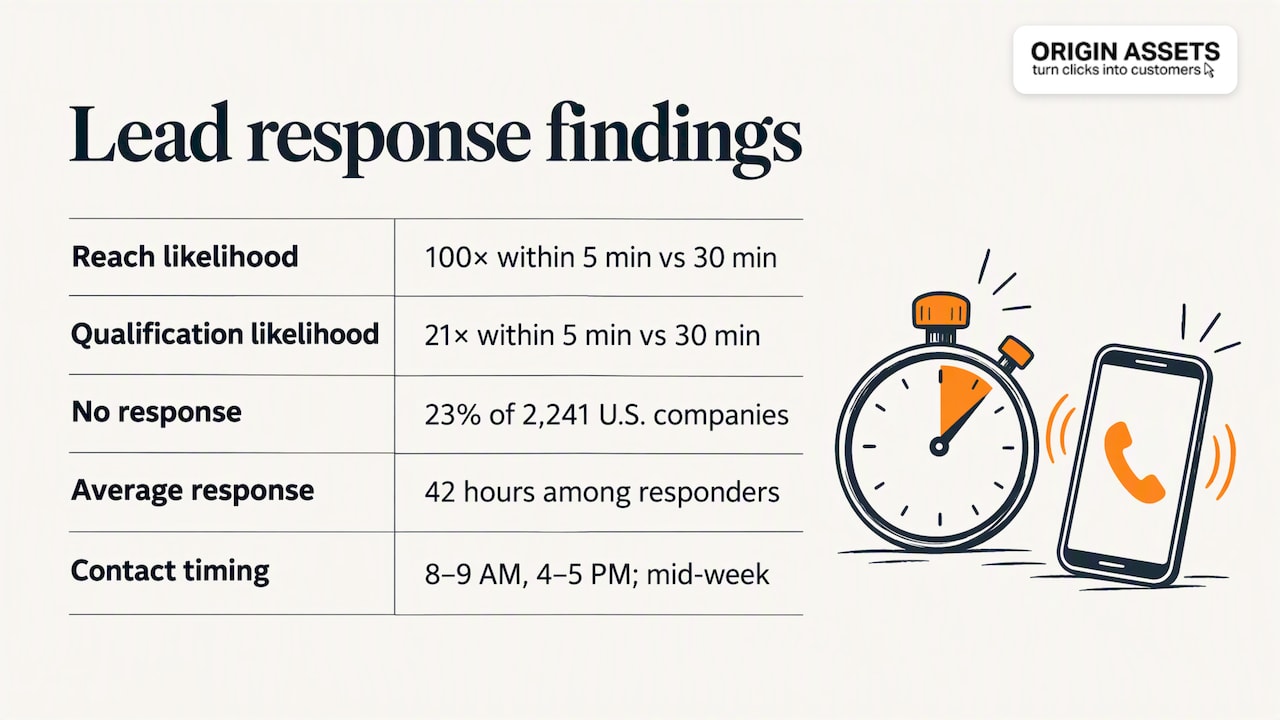
The case for automating routing rests on response time. A 2011 Harvard Business Review study reported that leads contacted within five minutes were 100 times more likely to be reached than those contacted after 30 minutes, and 21 times more likely to be qualified. The same research is summarized with a sobering finding: an audit of 2,241 U.S. companies found that 23% never responded at all, and those that did took 42 hours on average.
Treat these as directional rather than as a promise for your business. The study is more than a decade old and your results will depend on your industry and lead quality. But the direction is consistent: the faster the right person engages, the better the odds. Automated routing removes the slowest step, the wait for someone to read, decide and forward.
Timing of contact also matters. One set of best practices based on the Lead Response Management study suggests 8 to 9 AM and 4 to 5 PM as the most effective daily windows, and mid-week days as the most effective for qualifying. Use that as a starting hypothesis and check it against your own call logs.
One related leak for local businesses is the phone. If calls go unanswered while your team is on a job, your routing never sees them. Our piece on missed call text back shows how to get those inquiries into the same flow.

What to look for in lead routing software
You may not need a standalone tool. Many CRMs include assignment rules. When you evaluate options, check these capabilities:
- Assignment methods: support for round-robin and weighted assignment, and the ability to define custom routing criteria.
- Integrations: it should connect to your forms, CRM and marketing tools without custom code.
- Monitoring: dashboards that show how leads were assigned and flag exceptions.
- Qualification step: some platforms now include AI that screens responses first. HubSpot’s Customer Agent, for example, assesses answers against set criteria and labels prospects Qualified, Partially Qualified or Not Qualified.
- Fallback controls: out-of-office, capacity limits and escalation timers, as described above.
Pick the simplest tool that handles your rules. A five-person team with two territories does not need an enterprise routing platform.
Our perspective: routing starts on your website
Most advice on this topic assumes the leads already exist and are arriving in a CRM in a clean format. In our work with local businesses, that is rarely the case. The form asks for too little to route on, or too much and nobody completes it. Leads land in a shared inbox. Nobody owns the follow-up.
We think of the website as the first step of the routing system. A page that persuades the right visitor to submit the right details makes every later rule work. That is why we build sites around conversion and automated lead flow rather than appearance alone, and why we treat local SEO and user experience as part of the same system: they decide who arrives and what they tell you when they do.

Our advice for a business owner starting out: do not buy routing software first. Write down who should get which lead, make your form capture exactly that information, send every submission to one place, and add a text alert for the owner. That alone closes most of the gap. Once volume grows, layer in round-robin, capacity limits and escalation.
After a decade of working with business owners, the pattern holds: the businesses that win more of their inbound leads are rarely the ones with the fanciest tools. They respond fast, consistently, and with the right person.
— Rafael
Get the website side of lead flow built for you
If your leads are slow, scattered or too few, we can build the front end of the system: a conversion-focused website with forms that capture what your routing needs, local SEO that brings in nearby customers, and automated follow-up. Our website packages are published at $197 per month for Starter, $397 per month for Momentum and $447 per month for Accelerate; the setup fee is not published, so ask us for it.
Want to see what your current site is leaving on the table first? Try the website lead maximization ROI calculator, or read how to generate leads from your website in five steps. For automated follow-up after capture, see our email marketing automated systems and local SEO service.
FAQ
What does lead routing mean?
Lead routing is the process of distributing incoming leads to the right salesperson or team inside your company. Automated routing does this with rules, so assignment happens as soon as the lead is captured and no one has to triage by hand.
How is automated lead routing different from automated lead generation?
Lead generation attracts prospects and gets them to raise their hand. Lead routing begins after that moment and decides who owns the follow-up and what happens next. You need generation to have leads, and routing to make sure they are handled quickly.
What are the best practices for lead routing?
Define your rules before you configure any tool, and document them in one place. Layer simple methods such as territory and round-robin, and add fallbacks for absences, overload and unmatched leads. Keep your data clean, and escalate any lead that has not been worked within a set time.
Do small businesses need lead routing software?
Not always. If you have one or two people handling leads, a form that creates a record and sends an instant alert to the right person may be enough. Dedicated routing tools make sense once several people share leads and you need rotation, capacity limits and reporting.
Sources
- Automated lead routing: how to set it up (monday.com)
- Lead routing: how to assign leads faster with better data (ZoomInfo)
- Lead routing 101 (Calendly)
- Inbound lead management playbook (Surface Labs)
- Automated lead capture (monday.com)
- Automated lead distribution (Cal.com)
- Lead routing help center (Openprise)
- Lead distribution strategies and best practices (Storylane)
- How to automate lead routing (Clearbit)
- Sales automation definition (HubSpot)
- RRLA 2.0 setup and user reference guide (Salesforce AppExchange)
- Lead routing SLA guide (Salesforce AppExchange)
- Lead routing rules (Rework)
- Speed to lead: the Harvard research (SayVo)
- The 5-minute rule (Unred)
- Best practices for lead response management (CINC)
- Set up customer agent actions to qualify leads (HubSpot)
Recommended
Share this article

Written by : Rafael
Follow us
A quick overview of the topics covered in this article.
Latest articles
November 8, 2026
November 8, 2026