Google Business Profile Optimization: A Practical Local Checklist
A step-by-step guide to Google Business Profile optimization: verify, choose categories, add photos, post weekly, earn reviews and know what really moves rankings.
Google Business Profile optimization means making your listing complete, accurate and active so Google can match it to the right local searches and customers can act on it. You verify the profile, fill in every field truthfully, pick the most specific category, add real photos, post regularly and reply to reviews. There is no trick behind it. Google says its local results rely on relevance, distance and popularity, and your job is to give it clear information on the first of those and a good reputation on the third.
This guide walks you through each step in order, explains what optimization can and cannot do, and ends with a 30-day plan you can hand to a staff member or work through yourself.
TL;DR
- Only businesses that meet customers face to face are eligible. Claim and verify your profile first, because nothing else counts until it is verified.
- Google ranks local results on relevance, distance and popularity. You cannot pay for a better position, but complete, accurate information helps Google match you to searches.
- Choose the most specific primary category, add secondary categories sparingly, and fill in hours, services, attributes and your description.
- Add real photos and videos, post at least weekly, and reply to every review.
- Creating a profile is free. Be careful with anyone who promises a guaranteed ranking.
Table of Contents
- Who can have a Google Business Profile
- Claim and verify your profile
- What actually drives local ranking
- Fill in the core information
- Choose categories and attributes carefully
- Photos and videos
- Posts: your regular update channel
- Reviews: earn them and answer them
- Our perspective
- Make the website behind the profile do its job
- What optimization cannot do
- A 30-day optimization plan
- FAQ
- Sources
Who can have a Google Business Profile
Before you optimize anything, confirm you qualify. Google says only businesses that make face-to-face contact with customers are eligible. Online-only businesses and properties for rent or sale are not. That covers a storefront, an office where you meet clients, and a service-area business such as a plumber, electrician or roofer who travels to customers.
If you are a home service company, this matters. You can serve customers at their address and still qualify, but you should present your service area honestly rather than listing a fake office. Profiles that misrepresent where the business is tend to create verification problems later, and they undermine the trust the profile is supposed to build.
Claim and verify your profile
Verification is the gate. Per Google’s help page on editing your profile, a business must be added or claimed and its profile verified to show on Search, Maps and other Google services. Only after that can you update your address, hours, contact details and photos.
If you have no profile yet
- Sign in with a Google Account that your business will control long term, not a personal account an employee might lose.
- Go to business.google.com/add and click “Add your business to Google.”
- Follow the on-screen instructions to enter your details, then select a verification option. These steps are described on Google’s add or claim page.
If a listing already exists
Many businesses find a profile Google created from public data. According to the same Google guidance, you open Google Maps, search your business name and city, select the correct listing, choose “Claim this business” and “Manage now,” then complete a verification option. If someone else has already verified it, Google’s getting started guide says you can request ownership.
Video verification
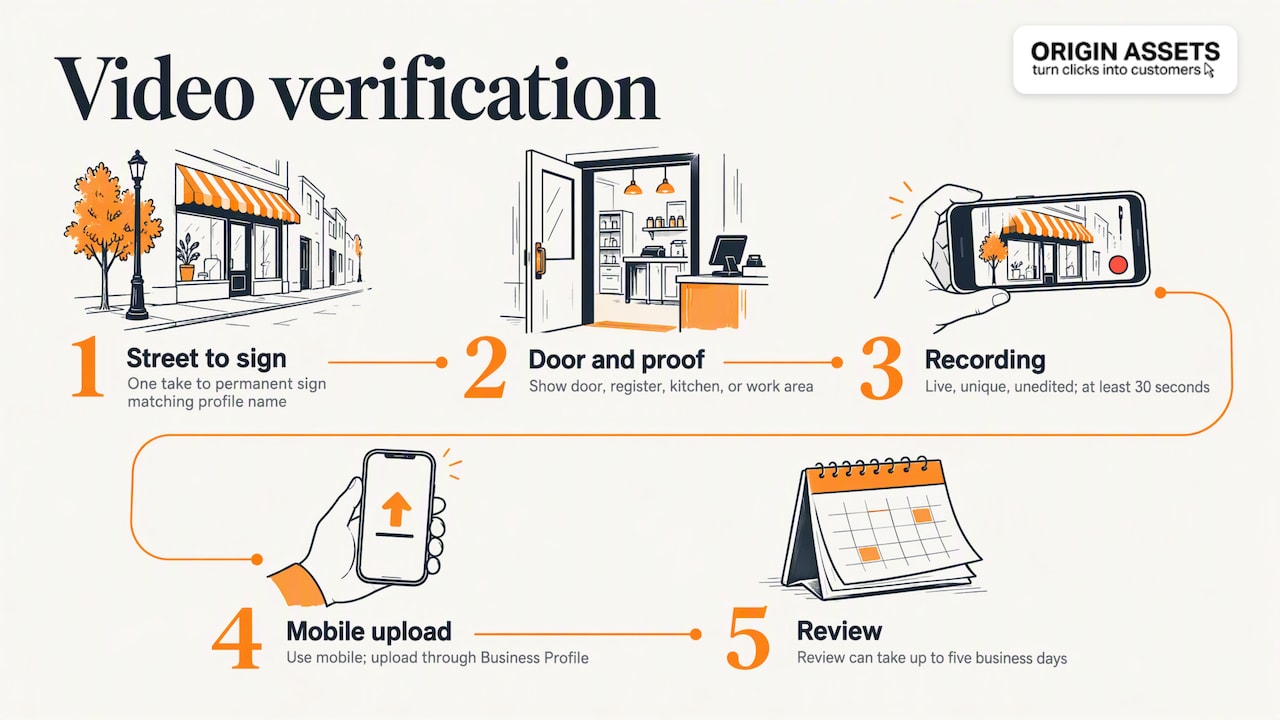
Often Google asks for a video. It must be a live, unedited, unique and complete recording of at least 30 seconds, recorded and uploaded from a mobile device through the Business Profile, and review can take up to 5 business days. For a storefront or hybrid business, the same page says the video should show the location, permanent signage whose name matches your profile, and proof that you manage the place, such as access to a cash register, kitchen, storage room or point-of-sale system.
Practical tip: walk in one continuous take from the street, to the sign, to the door, to the register or work area. If you run a service-area business, follow the instructions Google shows you for your verification type and have your vehicle, tools and signage ready, so you do not need to start again after a rejection.

What actually drives local ranking
It helps to know what you are optimizing for. Google states that local results are based mainly on relevance, distance and popularity:
- Relevance: how well your profile matches what someone searched for. Complete, accurate information helps here.
- Distance: how far you are from the searcher or from the location they named. You cannot optimize this, except by being honest about where you operate.
- Popularity: how well known your business is. Reviews, a strong website and mentions around the web all feed this picture.
The same page says there is no way to request or pay for a better local ranking. That is the most useful sentence in this whole topic. It means optimization is about representing your business well, then earning attention, not about gaming a setting.
Fill in the core information
The basics are unglamorous and they decide a lot. Google lists the fields you should keep current: business name, address or service area, phone, website, hours, photos, description, and the services or products you offer, in its guidance on editing your profile.
Use this checklist:
- Name: your real-world business name, as it appears on your signage and invoices. Do not add keywords or city names to it.
- Address or service area: a street address if customers visit you, a defined service area if you travel to them.
- Phone: a number that is answered. A missed call from a local searcher goes to the next listing.
- Website: link to a page that loads quickly on a phone and makes the next step obvious. If your site is the weak link, a profile that sends people to a slow, confusing page wastes the click.
- Hours: regular hours, plus special hours for holidays. Wrong hours are one of the quickest ways to lose a customer’s trust.
- Description: write plainly what you do, who you serve and where. Make it a short, honest summary, not a list of keywords.
- Services and products: list each one you actually sell, with a clear name.
Consistency matters beyond Google. Use the same name, address and phone number on your website, social profiles and directories, so that every source tells the same story.
Choose categories and attributes carefully
Categories are where most businesses go wrong, usually by adding too many. Google’s guidance says to select a primary category that represents the business as a whole, and you can select up to 9 more. Its guidelines for representing your business tell you to use as few categories as possible, to pick specific ones that describe what the business is rather than what it has, and not to use categories merely as keywords.
In practice:
- A roofing company picks the most specific roofing category as primary, not a general contractor one, if the specific one fits the core of the business.
- Add a secondary category only for a real, separate line of work you want to be found for.
- Review your categories now and then, since you may have added a service line that your profile does not yet reflect.
Attributes
Attributes are factual details such as Wi-Fi, outdoor seating or online services. Google explains that some attributes can help a profile appear for searches involving those features, and that the available attributes vary by category. Add only the ones that are true. The tips page also mentions details such as parking or Wi-Fi availability as part of improving your local ranking.
Photos and videos
Photos show customers what to expect before they call. Google recommends adding photos and videos to showcase your business, products and services, as noted in its local ranking tips and in its 2026 best practices playbook.
What to add first:
- Your storefront or, for service businesses, your branded vehicle and team in uniform.
- Interior or workspace shots.
- Finished jobs, with real before-and-after pairs where you have them.
- Your team, because people hire people.
Use your own images. Stock photos look generic and contradict the idea of a profile as a public source of truth about your business. Name files descriptively and add new images on a steady schedule rather than uploading fifty on one day and nothing for a year.
Posts: your regular update channel
The 2026 playbook recommends posting timely updates, offers and events at least weekly, using all three post types. It also reports that 50% of customers look for promotions or discounts when searching for a business online, which is a good reason to make offers visible.
A workable weekly rhythm for a small team:
- Week 1: an update with a recent project and a photo.
- Week 2: an offer, such as a seasonal inspection or a first-visit discount you can honor.
- Week 3: an event or announcement, like a community sponsorship or new service.
- Week 4: a tip customers actually ask you about.
Keep each one short, specific and tied to a clear action: call, book or visit. Do not publish an offer without an end date you can manage, and remove it when it lapses. Old offers on an active profile make you look careless.
Reviews: earn them and answer them
Reviews sit under popularity, and they are also the part customers read most closely. Google’s advice is simple: reply to customer reviews to show you value feedback.
How to build a steady flow:
- Ask at the right moment: right after a job is finished and the customer is happy.
- Make it easy: send a direct link to your review form by text or email.
- Reply to everything: thank positive reviewers by name and mention the work. For a negative review, respond calmly, acknowledge the problem and offer to resolve it offline.
- Do not offer rewards or write your own reviews. Honest reviews protect a profile that you want to keep for years.
We cover the process in more detail in our guide on how to gain more Google reviews, and in why a single bad rating can cost a business customers.
Our perspective
We work with local businesses whose websites were passive: attractive enough, but not producing calls. What we see again and again is that the profile and the website are two halves of one system. The profile earns the click, and the website has to turn that click into a lead. Optimizing only one of them leaves money on the table.

We also think the best optimization is the least clever. Accurate hours, a precise category, real photos, a steady posting habit and prompt review replies beat any shortcut, and they stay valuable when Google changes its interface. A profile is a public source of truth about your business, and credibility is built by being consistent over months, not by a one-weekend overhaul.
Finally, we would rather you understand the work than depend on us blindly. If you want a deeper walk-through of the surrounding tactics, our local SEO tips and our piece on winning local leads amid Google’s AI search updates are a good next step.
— Rafael
Make the website behind the profile do its job
Your profile sends people to your site, so the site should be ready for them. Our website packages start at $197 per month for the Starter Website Package, with the Momentum Website Package at $397 per month and the Accelerate Website Package at $447 per month. A setup fee applies and has no published price. You can compare the options on our website package pricing page. If you want help with the search side too, our local SEO service covers local visibility for businesses that serve a defined area.
What optimization cannot do
Be skeptical of promises. Google says no one can pay for a better local ranking, and in its guidance on working with third parties it says they cannot promise placement or directly influence ranking through special means. It also notes that only profile owners control access and can update permissions.
That gives you a short hiring checklist if you outsource the work:
- Keep ownership. Your business should be the owner of the profile, with any agency added as a manager.
- Ask for reporting. Google advises checking your profile’s performance, so ask what calls, direction requests and website clicks the profile generates.
- Walk away from guarantees of a number one spot.
Optimization also cannot fix a poor offer, slow response times or a website that does not convert. It improves how well you are represented, and the customer experience does the rest.
A 30-day optimization plan
- Days 1 to 3: claim or request ownership of your profile, then complete verification.
- Days 4 to 7: audit your name, address or service area, phone, website and hours against your website and signage. Fix any mismatch.
- Days 8 to 10: review your primary and secondary categories, then add accurate attributes and write your description.
- Days 11 to 15: list your services and products and upload your first set of real photos and a short video.
- Days 16 to 20: set up a review request routine and reply to every existing review.
- Days 21 to 30: publish your first four weekly posts and check your profile performance to see what customers do.
After the first month, schedule a monthly 30-minute check: hours, new photos, review replies and one post per week.
FAQ
How do I optimize my Google Business Profile?
Verify the profile, then keep your information accurate and complete: name, address or service area, phone, website, hours and description. Choose a specific primary category, add real photos, post updates regularly and reply to reviews. Google lists these actions in its tips for improving local ranking.
How much does Google Business Profile optimization cost?
Creating a profile is free, according to Google, and you can do the optimization steps yourself at no cost beyond your time. If you hire help, the price depends on the scope of work. Remember that no one can buy you a better ranking from Google.
Does Google Business Profile affect SEO?
It affects local search visibility, since Google’s local results draw on relevance, distance and popularity, and your profile supplies information for the first and feeds the third through reviews. It does not replace your website. A strong profile and a strong site work together, which is why we pair them in our local SEO work.
Can I optimize a profile that someone else manages?
If another party has verified your listing, you can request ownership through the claim process. Google’s getting started guide outlines this. Once you own it, you decide who gets manager access.
Sources
- Tips to improve your local ranking on Google
- Get started with Google Business Profile
- Add or claim your Business Profile
- Verify your business with a video recording
- Edit your Business Profile
- Guidelines for representing your business on Google
- Complete your Business Profile on Google
- GBP Best Practices Playbook 2026
- Tips for working with third parties to manage your Business Profile
- Your Business Profile questions, answered
Recommended
Share this article

Written by : Rafael
Follow us
A quick overview of the topics covered in this article.
Latest articles
November 8, 2026
November 8, 2026