Google Business Profile Optimization in Tampa: A Practical Guide
How Tampa businesses can claim, verify and optimize a Google Business Profile to show up in Maps and local search, with a checklist, mistakes to avoid and tracking tips.
Google Business Profile optimization means making your listing complete, accurate and active so Google can match it to Tampa searches and customers can trust it at a glance. You claim and verify the profile, fill in every field that applies to you, keep photos, posts and reviews current, and check the performance report to see what is working. Most of it costs nothing but time. This guide walks through each step the way we would for a Tampa business owner, from the first claim to the monthly routine that keeps you visible.
TL;DR
- Google says local results are mainly based on relevance, distance and prominence, and businesses cannot pay for a better local ranking.
- Your profile must represent a real business with in-person customer contact, so check eligibility before you claim or verify.
- Complete every field that applies: categories, hours, address or service area, services, attributes, photos and a plain-language description.
- Reply to reviews, post updates and keep hours current, then check the performance report each month for calls, website clicks and direction requests.
- The most common risks are a stuffed business name, duplicate profiles and a wrong address or service area.
Table of Contents
- What Google Business Profile optimization actually involves
- How Tampa profiles show up in local search and Maps
- Step 1: Confirm eligibility, then claim and verify
- Step 2: Complete the core information
- Step 3: Add photos, videos and posts
- Step 4: Manage reviews the right way
- Step 5: Measure what is working
- Common mistakes that cost Tampa businesses visibility
- Why your website matters as much as your profile
- Our perspective: the profile is a system, not a one-time setup
- Where Origin Assets fits
- A monthly routine you can keep
- Frequently asked questions
- Sources
What Google Business Profile optimization actually involves
Your Google Business Profile is the listing that appears when someone in Tampa searches for a plumber, a dentist, a restaurant or a roofer and sees the map with three businesses beneath it. It also appears when someone searches your name directly. Think of it as your public source of truth: the place where your hours, phone number, address, services and reviews are stated in one consistent form.
Optimization is not a trick. It is the work of giving Google accurate, complete information and giving customers a reason to choose you once they see it. That work falls into five areas:
- Eligibility and ownership: the profile is yours, it is verified, and it follows Google’s rules.
- Core information: name, categories, address or service area, hours, phone and website.
- Content: photos, videos, services, products, descriptions and posts.
- Reputation: reviews and how you answer them.
- Measurement: the numbers that tell you if any of it is working.
We cover each below, in the order we would do them.
How Tampa profiles show up in local search and Maps
Google states that local results are mainly based on three factors: relevance, distance and prominence. Here is what each means for a Tampa business.
- Relevance is how well your profile matches what the person typed. A complete profile with the right categories and services helps Google understand what you do.
- Distance is how far you are from the searcher, or from the location they named in the search. A search from Carrollwood and a search from Ybor City can return different businesses, which is why you cannot control a single “rank” for Tampa as a whole.
- Prominence is how well known your business is. Google notes that information from across the web, such as links, articles and directories, plus review count and ratings, can factor in.
Google also says the details of its local ranking are confidential and that it does not let businesses pay for better rankings. That is useful to know when someone promises you a guaranteed spot on the map. What you can do is control the things Google tells you matter: complete information, accurate details and a steady record of real customer feedback.
Distance also explains something Tampa owners notice quickly. If you are based in South Tampa and a customer searches from Brandon, a competitor closer to them may appear first. You cannot move your building. You can make sure your service area, categories and services show that you do work in the areas you want, and that your website and other listings back it up.
Step 1: Confirm eligibility, then claim and verify
Before anything else, check that your business qualifies. Google’s guidelines say a business needs in-person contact with customers during stated hours to be eligible. That covers storefronts, offices where you meet clients, and service businesses that travel to customers. It generally does not cover a business that only operates online or a home address with no customer contact.
Google’s basic guidelines also ask you to represent your business as it is consistently recognized in the real world, to keep your address or service area accurate, and to keep to one profile per business.
Claim your profile
- Search for your business name in Google Maps. If a profile already exists, you may be able to request ownership instead of creating a new one. Duplicates cause problems with how your information displays.
- If none exists, add your business and enter the name, category and location details.
- Choose whether customers visit you, you visit customers, or both. This decides whether you show an address, a service area or both.
Verify it
Verification proves the business is real and that you control it. Depending on your business, Google may offer different methods. One option is a video recording uploaded from a mobile device, which Google says it reviews within 5 business days. When you record, show what a customer would see: your signage, your location and your equipment or work area, so the video connects the business to the address.
If your verification stalls, do not create a second profile to get around it. That is how duplicates start, and duplicates are one of the most common reasons a listing gets into trouble.
Step 2: Complete the core information
Google’s own advice is to enter complete, accurate data: a full address if customers visit you, business hours, a category and attributes such as parking or Wi-Fi. Here is how to handle each field.
Business name
Use your real business name, the one on your sign, invoices and website. Do not add “Tampa”, a service or a tagline to it to catch more searches. Google’s guidelines tie your name to how the business is represented in the real world, and a name stuffed with keywords is a classic reason for edits to be rejected or a listing to be suspended.
Categories
Google advises choosing the fewest categories needed to describe your core business. Pick the primary category that matches your main revenue source, then add secondary ones only when they are true. A Tampa air conditioning contractor might choose one HVAC category as primary and one closely related secondary, not ten loosely related ones.
Address or service area
If customers come to you, show your address. If you travel to them, set a service area that reflects where you actually work. List the Tampa Bay areas you really serve, such as Tampa, Brandon, Riverview, Temple Terrace or Clearwater, rather than a huge radius you cannot cover. An accurate service area also protects you from complaints and edits.
Hours
Set regular hours, and update them for holidays and for days you close unexpectedly. Florida businesses know that storms can shut things down, so make a habit of changing your hours before you close, not after customers show up to a locked door. Wrong hours are one of the quickest ways to lose trust and earn a bad review.
Phone and website
Use a local phone number that someone answers during your stated hours. Link to the page that best matches the visitor’s intent. For a single-location business, the homepage often works. For a multi-location business, link each profile to its own location page.
Attributes, services and description
Attributes (wheelchair accessible, free Wi-Fi, online appointments and similar) help customers screen you quickly. Add your services with a short, honest description of each. In the business description, say plainly what you do, who you serve and what makes you credible: years in business, licenses you hold, the neighborhoods you work in. Google’s content rules allow contact details for your own business but not solicitation of personal or confidential information, and they ask for useful information on services and products, not promotions stuffed into the description.
Step 3: Add photos, videos and posts
Google recommends adding photos and videos to your profile. For a local business, real images do more than polished stock images. Include:
- Your exterior and entrance, so customers can recognize the location.
- Your team, in uniform or at work.
- Finished projects, with a short caption that mentions the type of work and the area.
- Interior shots, menus, product shelves or equipment, depending on your business.
- A short video walking through the space or showing a job.
Photos taken on your phone are fine. What matters is that they are real, current and clear. Replace outdated ones when your storefront, vehicles or team change.
Posts
Posts let you share updates, seasonal offers and events directly on your profile. Google asks that posts be professional, respectful and family-friendly, and it restricts content about regulated goods such as alcohol and financial services. Read the full post policy before you publish if your business falls near those categories.
A simple posting routine for a Tampa business:
- One post a week or every two weeks about a recent job, a seasonal reminder or a team update.
- A clear next step, such as call, book or get directions.
- A real photo with every post.
Keep the claims you make factual and the offers time-neutral unless you are ready to take them down when they end.
Step 4: Manage reviews the right way
Reviews feed the prominence part of the equation, and they also decide whether a customer clicks you or the next listing. Reviews are about reputation first and ranking second, so treat them that way.
- Ask every happy customer. Send the direct review link by text or email right after the job, while the experience is fresh. Make it easy, not pushy.
- Respond to all of them. Thank positive reviewers by name and mention the work you did. Respond to negative ones calmly, state the facts briefly and offer to resolve it offline.
- Do not buy, trade or fake reviews. Google’s content policies prohibit fake engagement, and it is not worth risking your profile.
- Report what violates policy. If a review is spam or off topic, flag it through the profile instead of arguing in public.
A response is also a public sentence addressed to the next customer reading it. Write it for them.
Step 5: Measure what is working
Optimization without measurement is guessing. Google’s Business Profile performance report shows how customers interact with your profile on Search and Maps, including views, searches, calls, website clicks and direction requests.
Check it monthly and ask four questions:
- Are views and searches rising or falling, and did that follow a change you made?
- Are people calling, clicking or asking for directions at a healthy rate relative to views?
- Which search terms bring people to you, and do they match the services you want more of?
- Do the calls and form submissions you see in your own records line up with what the profile reports?
The last question matters most. Profile clicks are not leads until someone contacts you. Use a dedicated tracking phone number or tagged website link only if you can keep your main number consistent across the web, and keep your own record of where each new customer says they found you.
Common mistakes that cost Tampa businesses visibility
These are the problems we see most often, and each one conflicts with Google’s published guidelines.
| Mistake | Why it hurts | What to do instead |
|---|---|---|
| Adding keywords or a city to the business name | Does not match how the business is represented in the real world, and can lead to rejected edits or suspension | Use the name on your signage and paperwork |
| Creating a second profile for the same business | Google asks for one profile per business, and duplicates confuse how information displays | Claim or request ownership of the existing one |
| Too many categories | Dilutes what Google thinks you do | Choose the fewest that describe your core business |
| Using a fake or shared address | Fails the in-person contact and accuracy requirements | Show a real location or set a service area |
| Out-of-date hours or phone number | Frustrates customers and invites negative reviews | Update after any change, including closures |
| Ignoring reviews | Signals you are not engaged | Reply to every review |
| Posting restricted content | Posts can be rejected for regulated goods | Follow the posts policy |
| No tracking | You cannot tell what works | Review performance monthly |
An important point on consistency: your name, address and phone number should match your website, your other directory listings and your social profiles. When Google sees the same details everywhere, it has more confidence in them. For more tactics beyond the profile, our local SEO tips cover the wider picture.
Why your website matters as much as your profile
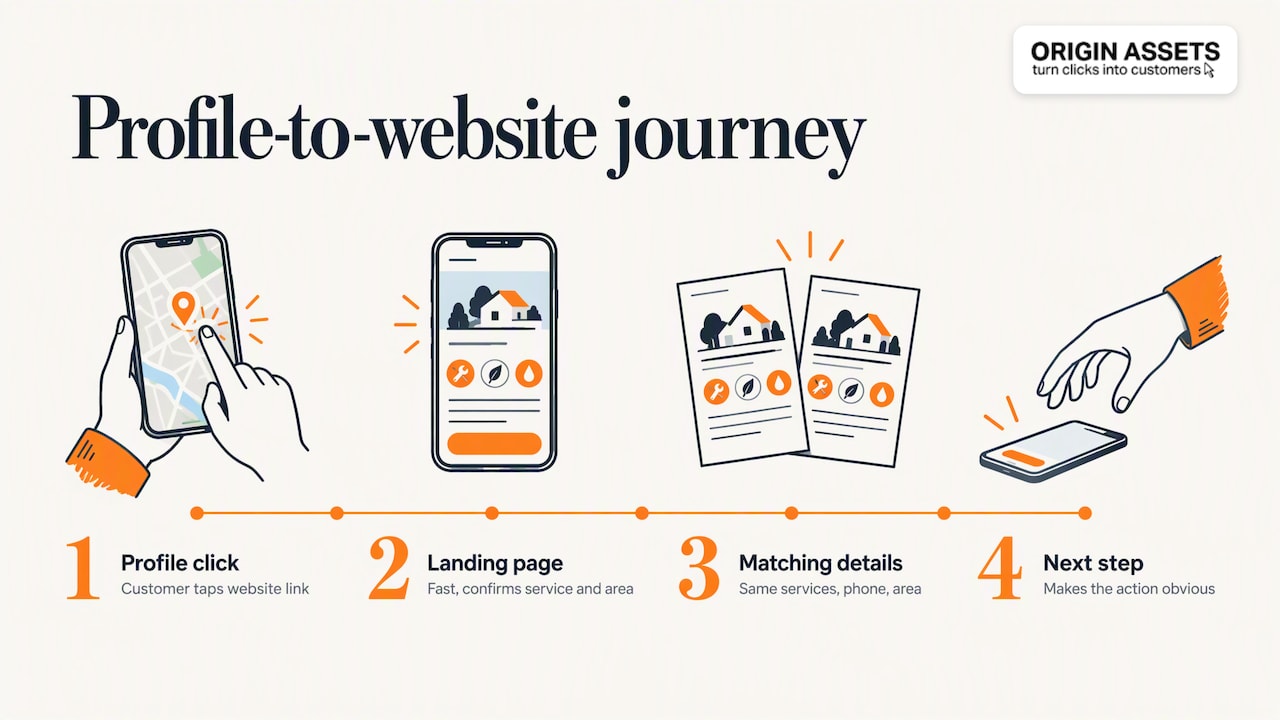
The profile gets the click. The website closes the deal. A customer who taps your website link from the map expects to land on a page that loads fast on a phone, confirms the service they searched for, shows your service area and makes the next step obvious. If it does not, the profile’s work is wasted.
This is where many Tampa businesses leak leads: a strong profile pointing to a slow, vague or outdated site. Matching your landing page to the profile (same services, same phone number, same area) also reinforces the consistency Google looks for. If you want a closer look at turning visits into inquiries, see our guide on how to generate leads from your website.
Our own step-by-step version of this process is also available as a practical local checklist for Google Business Profile optimization, which you can use alongside this guide.

Our perspective: the profile is a system, not a one-time setup
We work with local service businesses, and the pattern repeats. Owners fill in a profile once, see a small bump, and then let it sit. Six months later the hours are wrong, there are no new photos, three reviews are unanswered, and the website link goes to a page that no longer matches the service.
What we believe is simple. A profile earns visibility when it is credible, consistent and current. Credible means the information is true and verifiable. Consistent means it matches your website and every other place your business appears. Current means someone owns the job of keeping it that way.

We also believe the profile should not stand alone. Your local presence is the profile, the website behind it, the reviews around it and the follow-up after a customer reaches out. When those pieces connect, a call or form submission becomes a predictable flow instead of an occasional surprise, and you do not need to keep buying ads to prop it up. That is the thinking behind how we build websites and lead systems for local businesses, and it is why we treat profile work as part of a larger local SEO service rather than a stand-alone task.
If you do only three things this month, make them these: confirm your categories and address, add ten real photos, and reply to every open review.
— Rafael
Where Origin Assets fits
If you would rather hand this to a team, we build websites that turn profile visits into leads and support them with local SEO. Our website packages are published on our pricing page: the Starter Website Package is $197 per month, the Momentum Website Package is $397 per month and the Accelerate Website Package is $447 per month. A setup fee applies, and you can see the details on that page. For ongoing profile and search work, start with our local SEO service.

If you are not sure which fits your business, tell us what you sell and where you serve, and we will point you to the right starting point.
A monthly routine you can keep
Optimization sticks when it is small enough to repeat. Here is a 30-minute monthly routine:
- Check the basics (5 minutes). Hours, phone, website link, address or service area, categories.
- Add fresh media (5 minutes). Upload at least three new photos from recent work.
- Publish a post (5 minutes). One update that follows the posts policy.
- Handle reviews (10 minutes). Reply to every new review and send two or three review requests to recent customers.
- Read the report (5 minutes). Note views, calls, website clicks and direction requests, and compare them with last month.
After a quarter, you will have a clear record of what moved the numbers, and you can put your effort where it pays.
Frequently asked questions
Is Google Business Profile optimization free?
Yes, creating and managing the profile is free, and Google states that businesses cannot pay for a better local ranking. What costs money is your time, or the fee for someone to manage it for you. Be cautious of any offer that implies you can buy a guaranteed position.
How long does it take to see results?
It depends on your competition, your area and how much needs fixing. Corrections such as hours and categories can show up quickly, while reviews and prominence build over months. Use the performance report to track direction over time instead of expecting a fixed timeline.
Can I have a profile if I work from home in Tampa?
It depends on whether you meet Google’s eligibility rules, which require in-person contact with customers during stated hours. Service businesses that travel to customers can qualify and set a service area. If you do not meet customers in person, check Google’s current eligibility guidelines before applying.
Do I need a website if I have a profile?
Google can show a profile without a website, but a good site gives customers the detail they need to contact you and gives Google more information about your business. A fast, clear website that matches your profile turns more of your profile visits into inquiries.
What should I do if my profile is suspended?
First, review Google’s guidelines for your name, address, categories and content, and fix anything that does not match. Then follow the reinstatement steps in your profile. Do not create a new profile for the same business, because that breaks the one-profile rule and can make things worse.
Sources
- Tips to improve your local ranking on Google
- Business eligibility and ownership guidelines
- Verify your business with a video recording
- Guidelines for representing your business on Google
- Create and manage posts on your Business Profile
- Understand your Business Profile performance and insights
Recommended
Share this article

Written by : Rafael
Follow us
A quick overview of the topics covered in this article.
Latest articles
November 9, 2026
November 9, 2026